If, after logging in, you are taken to a page with a message about restricted access, this is the «Access Restricted» page (often referred to as «You are blocked»). It informs you that your account has been temporarily blocked and that you cannot use the web panel during this period.
When does it appear?
The page opens only when the panel administration has applied restrictions to your account. This means that you have violated the community rules, causing the administration to block you.
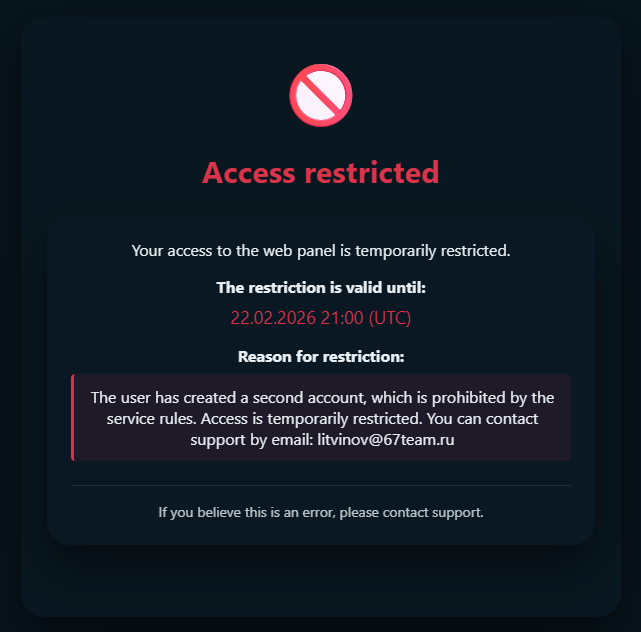
What does it show?
- Text about the temporary restriction of access to the web panel.
- Date and time of the restriction's end (UTC) – you won't be able to log in to the panel until this date.
- Reason for the restriction – this usually describes the rules you broke.
- Tip: if you believe the restriction has been applied in error, you can contact support.
The side menu and exit button are not displayed on this page: blocked users can only access information about the restriction.
What can and cannot be done while blocked?
- You cannot use the panel (flights, companies, settings, etc.) or log out of your account via the panel interface while the restriction is in effect.
- You can read the message, the end date, and the reason (if specified).
After the end date of the block, the restriction is automatically lifted – the next time you log in, you will be able to access the panel again.
Frequently asked questions
How can I appeal a block?
Write to the panel support team using the contact details provided on the website. Describe the situation and explain why you believe the block is incorrect. The administration will review your request and inform you of their decision.
Is the block permanent?
No. The restriction is set for a period until the specified date and time. After this date, access is automatically restored. If the date is not displayed, you can check the period with support.
Why can't I click «Log out»?
For blocked users, logging out of their account on the restriction page is disabled. This is done to make it more difficult for users to create a second account (which, incidentally, is prohibited by the service rules).
I didn't do anything wrong. Why was I blocked?
If the reason was specified by the administration, it will be displayed on the restriction page. If it is not there or you need clarification, contact support – there you can ask questions and appeal the decision.